ALDI Grocery Pickup & Delivery
- 4.8
- Rating
- 5.00M
- Installs
- Free
- Price

 Analysis by App-foxy
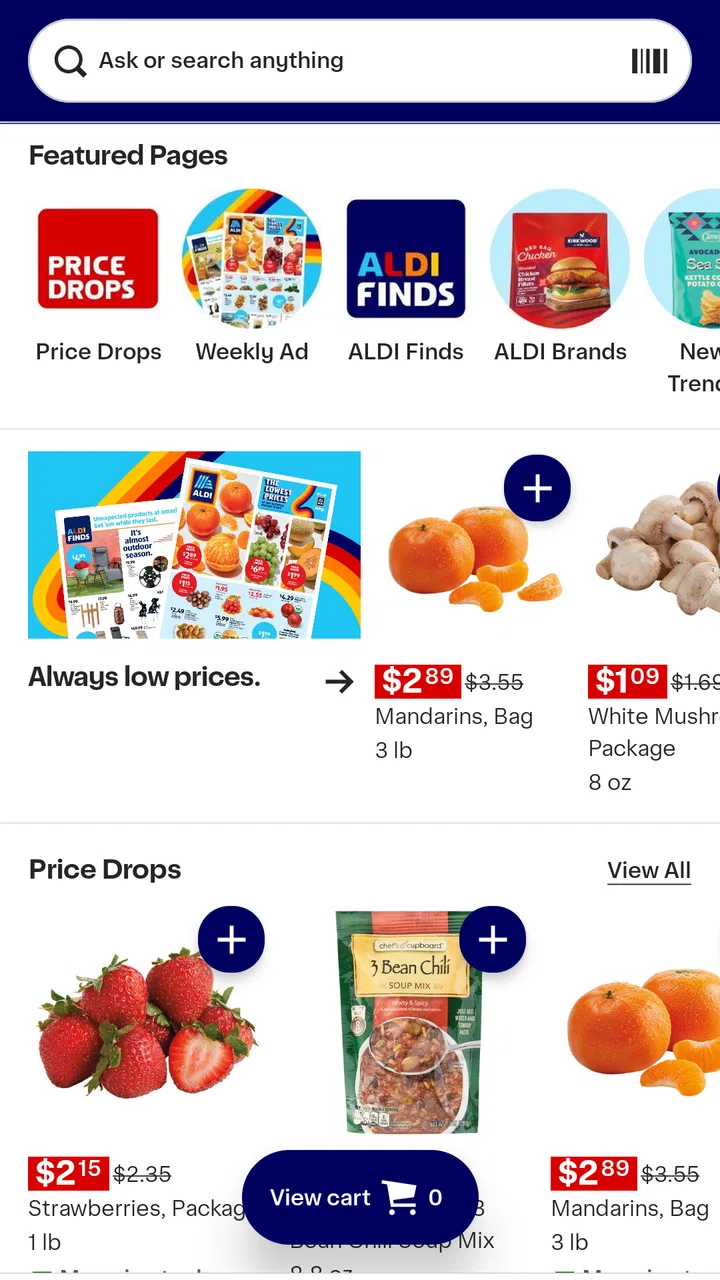
I installed ALDI USA expecting a fairly simple shopping companion, and that is exactly where it makes the most sense. It is a free shopping app from ALDI International Services SE & Co. oHG, built for people who already buy groceries at ALDI or want an easier way to plan a visit. Rather than trying to replace every shopping tool on your phone, it focuses on helping you look ahead, organize what you want, and arrive at the store with a clearer idea of what to buy.
My overall impression is positive, especially if ALDI is part of your normal grocery routine. The app has a 4.7 average from around 32 thousand ratings, with more than 5 million installs, so it is clearly being used by a large audience. Still, popularity does not make it perfect. Its value depends heavily on what you expect from a grocery app. If you want a complete household budget system, detailed nutrition planning, or a universal shopping list that combines several supermarkets, you may need another tool alongside it.
How I use ALDI USA for a normal shopping trip
The most useful starting point is to treat the app as a preparation tool rather than something you constantly operate while walking through the aisles. Before leaving home, I use it to browse the current grocery and household selection, notice items that fit the week’s meals, and make a short plan. That simple change prevents the common habit of entering a store without a clear idea and then trying to remember everything from memory.
You May Also Like

 Blood Strike: 2.5 Anniversary
Blood Strike’s Loadouts Turn Every Drop Into a Tactical Gamble
A close look at Blood Strike’s custom loadouts: how fast access to signature weapons reshapes its battle royale rhythm, rewards preparation, and narrows the gap between fights.

 Pandora - Music & Podcasts
Pandora’s Music Is Easy to Start, but Harder to Recover
Pandora’s strength is its low-effort path from a seed to a station. Its weak spot is how much confidence it asks you to place in connection, setup, and quiet recovery.

 8 Ball Pool
 Is Built on Rivalries, Rematches, and Routine
A close look at the rivalries, rematches, shared routines, and unanswered safety questions that turn a quick pool match into a persistent mobile community.

 Samsung Music
’s Quiet Strength Is Playing What You Already Own
Its reach comes less from spectacle than from dependable access to a personal library. That simplicity is both the app’s strongest retention engine and its ceiling.

 AccuWeather: Weather Radar
AccuWeather Review: A Quick, Clear Forecast for Everyday Decisions
For everyday plans, the best forecast is the one you can understand quickly. AccuWeather makes rain timing, radar, and local conditions easy to act on, with a few trade-offs.

 Hill Climb Racing
Why Hill Climb Racing Still Turns Crashes Into One More Run
A tiny car, a bumpy hill and one more upgrade: Hill Climb Racing keeps resurfacing because its simple chaos makes every near-miss feel personal.
More From Our News Desk
View All News


A realistic example is a busy weekday evening. I might need ingredients for several dinners, breakfast basics, and one or two household products. Instead of opening a general search engine, I check ALDI USA first, scan what is relevant, and write down the items I genuinely intend to look for. I then separate essentials from optional purchases. This is a small workflow, but it makes the app more useful than simply browsing products for entertainment.
I also recommend checking the app before making a special trip for one particular item. Grocery availability can change, and a product shown in a digital catalog should not automatically be treated as a guarantee that the nearest store has it at that exact moment. For me, the sensible approach is to use the app to decide whether a trip is worth considering, then keep a backup plan if the item is important.
The app is free and rated for Everyone, which makes it approachable for a shared household. One person can look through the selection, another can use the resulting list during the trip, and neither needs to learn a complicated system. The current version is 9.2535.1, and the app supports operating system version 9 or later. That makes it practical for people who keep an older phone for everyday tasks, provided the device meets that requirement.
What the first few minutes should accomplish
When I open a retailer app, I do not want to spend the first few minutes wandering through screens without a purpose. With ALDI USA, I suggest beginning with a specific shopping mission: a weekly grocery run, a search for a seasonal item, or a quick look at household products. Having that goal makes the browsing experience more efficient and reduces impulse decisions.
I find it helpful to create a mental three-part list: items I must buy, items I would buy if available, and items I am only curious about. The app can help with discovery, but the discipline comes from the shopper. This distinction matters because browsing a retailer’s range can easily turn into a long list of things that were never part of the household budget.
Another practical habit is to review the list once more immediately before leaving. I remove duplicates, check whether an item is already at home, and group similar needs together. This is not a glamorous feature, but it is where the app becomes genuinely useful. The best shopping workflow is not the one with the most taps; it is the one that reduces forgotten essentials and unnecessary detours.
Settings and phone habits worth checking
I would not recommend turning on every notification simply because an app offers them. For a grocery app, alerts are only helpful when they match how often you shop. If you visit ALDI regularly, timely reminders about new selections may be useful. If you shop only occasionally, too many alerts can become background noise and make you ignore the messages that matter.
It is also worth checking the app’s notification choices after installation and revisiting them after a week. That gives you enough time to see whether the messages support your routine or interrupt it. My preference is to keep only the information that helps me make a decision before shopping. Anything that encourages aimless browsing gets less value from my point of view.
On the phone itself, I keep the app easy to reach on the home screen during a shopping week, then move it out of the way when I am not planning a trip. This sounds minor, but it encourages deliberate use. A grocery app works best when it is opened at the right moment: while planning meals, checking a possible purchase, or preparing to leave.
People often ask whether they need a newer phone to use it comfortably. Not necessarily. The important compatibility point is the minimum operating system requirement, not whether the handset is a recent flagship. On a supported device, the experience should be judged by screen size, speed, and connection quality. A small or older phone may still work, but browsing product information is more comfortable on a responsive screen.
Faster patterns for repeat shoppers
Experienced users do not need to explore the entire app on every visit. I use a repeatable pattern: check the selection, identify the purpose of the trip, make a compact list, and stop browsing once the plan is complete. Repeating that sequence saves more time than searching for a clever shortcut that may not exist.
For a weekly shop, I would start with the meals that are already decided. If I know I need ingredients for three dinners, I look for those first. Next, I add staples and household necessities. Only after the essentials are covered do I consider optional products. This order keeps the app connected to real needs instead of allowing the catalog to dictate the entire trip.
A second useful pattern is to use the app as a comparison point rather than as the only source of planning. If I normally keep a note on my phone, I can use that note for quantities and household reminders while using ALDI USA to inspect the retailer’s current range. This division of labor is often better than forcing one app to manage every detail.
For families, I prefer one shared list with clear wording instead of several separate messages. “Milk” may be enough for one household, while another may need to specify the type or size. The more precise the list, the less time is spent sending follow-up questions from the store. The app helps with the retailer side of the process, but good list design still depends on the people using it.
There is also a useful trade-off between browsing at home and browsing in the store. At home, I can think about meals and budget without pressure. In the store, I can react to what is actually available. I use the app mainly before the visit, because that is when it has the greatest effect on decision quality. I would not rely on it as a replacement for observing the physical shelves.
Where the app is strong, and where it reaches its limits
The strongest part of ALDI USA is its focus. It is not trying to be a general-purpose grocery marketplace with every retailer and every household feature included. For an ALDI customer, that focus makes the experience more relevant than a generic note-taking app. The store’s groceries and household products are the center of the workflow, so the browsing feels connected to an actual visit.
That same focus is also the main limitation. If your household shops at several supermarkets and you want one combined inventory, ALDI USA will not replace a dedicated list or meal-planning app. A general list app is better when you need quantities, pantry tracking, recurring tasks, and products from multiple stores in one place. I would use ALDI USA for retailer-specific discovery and another tool for broader household organization.
It is also not the right choice for someone who wants detailed financial analysis. The app can support better preparation, but it is not a substitute for a budgeting system that tracks spending across stores, categories, and months. If controlling the total grocery bill is your main goal, I would pair it with a budget app or a simple spreadsheet rather than expecting the retailer app to provide that complete picture.
Another limitation is the difference between seeing an item and obtaining it. A digital listing can help you decide what to look for, but it cannot remove the uncertainty of a real shopping trip. Seasonal products, limited selections, and changing stock are precisely the situations where I keep expectations flexible. The app is most reliable as a planning aid, not as a promise that every desired product will be waiting in a particular aisle.
Shoppers who dislike retailer-specific apps may also find the experience unnecessary. If you already have a dependable routine, remember your usual purchases, and do not care about browsing ALDI’s selection in advance, a paper list may be faster. I would not install this app simply because it is available. I would install it when its retailer-focused information solves a problem I actually have.
Small habits that improve the experience
One of my favorite practical habits is to review the app at a fixed point in the week, such as before planning meals. That creates a natural boundary around browsing. Instead of checking repeatedly throughout the day, I give myself one useful planning session and then turn the information into a list.
I also avoid adding an item merely because it looks interesting. I ask whether it has a meal, household purpose, or replacement need attached to it. This keeps the app from becoming an impulse-shopping engine. The retailer’s low-price positioning can be appealing, but a low individual price still adds to the total when several unplanned items enter the cart.
For a rushed trip, I reduce the list to essentials and use the app only for the one or two products that prompted the visit. For a larger weekly shop, I spend more time planning and use categories such as meals, breakfast, cleaning, and personal care. Adjusting the depth of preparation to the trip is more effective than following one rigid method every time.
If another person is shopping for me, I make the instructions concrete and include acceptable substitutions in the accompanying note. That prevents a simple “please pick this up” message from turning into a series of calls. The app can show the intended product, while the note handles household preferences that a retailer catalog cannot know.
How it compares with ordinary alternatives
Compared with a paper list, ALDI USA is better for discovering what the retailer is currently presenting and for planning before leaving home. Paper is faster for a tiny list and does not depend on a phone battery or screen. I see them as complementary rather than competing tools: the app helps me prepare, while paper can be a convenient final checklist.
Compared with a general notes app, ALDI USA offers more retailer-specific context. A notes app wins for flexibility, especially if I need to combine ALDI purchases with errands at other stores. The choice depends on whether the shopping problem is “What do I need everywhere?” or “What should I look for during this ALDI visit?”
Compared with a dedicated grocery-planning app, ALDI USA is simpler and narrower. A specialized planner may be better for recipes, pantry inventories, recurring quantities, and household sharing. I prefer ALDI USA when I want direct connection to ALDI’s products and a lighter planning process. I would choose the dedicated planner when managing the whole household is more important than browsing one retailer.
Compared with visiting the store without preparation, the app gives me a better chance of making a focused trip. That is its most realistic advantage. It does not need to transform grocery shopping to be worthwhile; it only needs to make the preparation stage clearer and less forgetful.
Who should install it
I think ALDI USA is a good fit for regular ALDI shoppers, households that plan weekly groceries, and people who like checking a retailer’s selection before deciding what to cook. It is also useful for anyone who often forgets one or two essentials and wants a more deliberate pre-trip routine.
It may be less useful for shoppers who rarely visit ALDI, people who want one list covering many retailers, and users looking for deep budgeting or nutrition tools. In those cases, a general shopping organizer may offer more value, with this app serving only as an occasional reference.
The developer is ALDI International Services SE & Co. oHG, and the app has been available since 2011. That long presence, combined with its strong user response, gives me confidence that it is an established part of ALDI’s digital shopping experience. Even so, I judge it by practical usefulness rather than by age or popularity.
My final recommendation after building a routine
After using ALDI USA as part of a repeatable shopping habit, I see it as a focused companion rather than a complete grocery-management system. Its best use is simple: open it before shopping, check what is relevant, turn that information into a short plan, and keep expectations realistic about the physical store.
The key is to use the app before the trip, not let the app plan the entire trip for you. That approach gives it a clear job and avoids its main weaknesses. I would recommend downloading it if ALDI is one of your regular stops and you want easier preparation at no cost. I would skip it if you need cross-store planning, detailed spending records, or a full pantry-management system.
For me, the result is worthwhile because the app reduces uncertainty without demanding a complicated routine. It helps me decide what deserves attention, reminds me to shop with a purpose, and leaves the final judgment where it belongs: with the person planning the household’s food and spending. Used that way, ALDI USA is a practical shopping aid, not an overbuilt replacement for every other tool on the phone.
FAQs for ALDI Grocery Pickup & Delivery
01What features does the ALDI USA app offer?
The ALDI USA app provides a streamlined shopping experience with features like weekly ads, store locators, and a digital shopping list. It also includes special buy alerts and product searching capabilities, helping users plan their shopping trips efficiently and save money by finding the best deals.
02Is the ALDI USA app available for both Android and iOS?
Yes, the ALDI USA app is available for download on both Android and iOS platforms. You can find it on the Google Play Store for Android devices and the Apple App Store for iOS devices, ensuring a seamless shopping experience across different smartphones.
03How does the ALDI USA app enhance the shopping experience?
The app enhances the shopping experience by providing users with easy access to current weekly ads and store specials. It allows users to create and manage shopping lists directly within the app, track upcoming offers, and receive notifications for special buys, making shopping more convenient and efficient.
04Are there any privacy concerns with using the ALDI USA app?
Like most apps, the ALDI USA app collects data to improve user experience, such as location for store locator services. However, ALDI is committed to safeguarding user privacy, and users can manage their privacy settings within the app. It's advisable to review the privacy policy for detailed information.
05Do I need an account to use all features of the ALDI USA app?
While you can access most features without an account, creating an account can enhance your experience. It allows you to save shopping lists and preferences, receive personalized notifications, and access additional app functionalities. Signing up is straightforward and can be done directly through the app.
Pros
- User-friendly interface and navigation.
- Exclusive discounts and promotions.
- Efficient grocery list feature.
- Access to weekly ads and deals.
- Simple account management options.
Cons
- Limited payment methods available.
- Occasional app crashes reported.
- Inconsistent inventory updates.
- No delivery service integration.
- Limited customer support options.

ALDI Grocery Pickup & Delivery
Gallery